
Ceci est une ancienne révision du document !
Table des matières
Digicode authentication : User Guide
Introduction
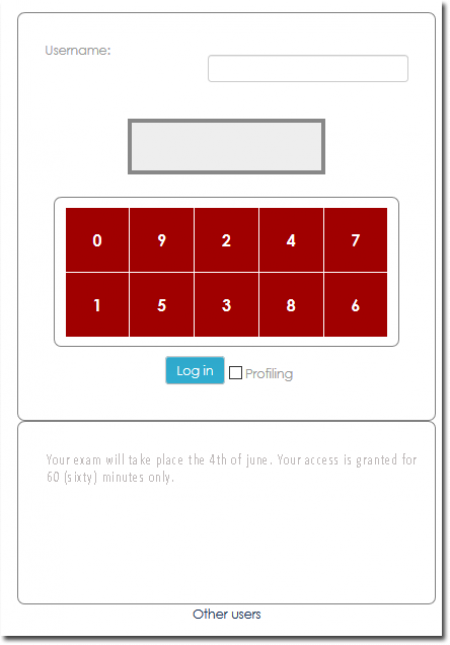
There is no direct use of this component, except the ability to a user for performance reasons, to connect to Moodle via standard login and password replaced by a digicode, to arrive directly on an internal page of moodle and under his identity.
use case
A Moodle platform with high but punctual load peaks, requiring a very high number of simultaneous connection.
Login page
Configuration
Access
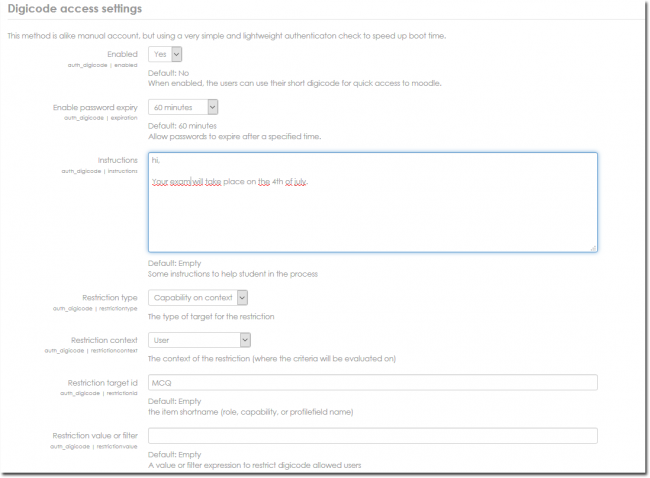
Site administration/plugins/authentication/digicode access
Active
yes/no: No default. When enabled, the users can use their short digicode for quick access to moodle.
enable password expiry
Allow passwords to expire after a specified time.
Instructions
Instructions optionnelles affichées sous la mire de connexion
Restriction type
The type of target for the restriction
- None
- user profile field
- Capability on context
- Role in context
Restriction context
Context in wich restriction is applied : The context of the restriction where the criteria will be evaluated on
- Site
- Course
- User
Restriction value or filter
A value or filter expression to restrict digicode allowed users
Credits
- Valéry Frémaux (valery@activeprolearn.com)) Development
- Florence Labord (florence@activeprolearn.com) Documentation
Back to the component index- Plugins index - Back to catalogue